Function parameters, return types, and overloading
Function parameters, arguments, and return types are essential concepts in programming. Parameters are variables that are used to pass values to a function, arguments are the actual values passed to the parameters, and return types determine the type of value returned by a function.
Lets Go!

Function parameters, return types, and overloading
Lesson 12
Understand how to use parameters and return types in functions and implement function overloading.
Get Started 🍁Introduction to Function Parameters, Arguments, and Return Types
Welcome to our course on Function Parameters, Arguments, and Return Types! In this course, we will delve into the fundamental concepts surrounding function parameters, arguments, and return types in programming.
Have you ever wondered how to streamline your code and avoid repeating yourself? Well, in this course, we will address just that. We will explore how to use functions effectively to avoid duplicated code, improve code readability, and enhance code maintainability.
Throughout this course, we will cover essential topics such as defining function parameters, passing arguments to functions, handling return types, and understanding the flow of passing values in a function. We will provide a comprehensive overview, guiding you through the process of effectively utilizing parameters and return types in your programming endeavors.
Join us as we explore the ins and outs of function parameters, arguments, and return types. Get ready to enhance your programming skills and take your code to the next level!
Are you ready to streamline your code and maximize efficiency? Let's dive in and uncover the power of function parameters, arguments, and return types together.
Main Concepts of Function Parameters, Arguments, and Return Types
-
Function Parameters: Parameters are variables used in a function to receive inputs from the caller. In the video,
num1andnum2are parameters in theaddfunction that receive the values passed when the function is called. -
Arguments: Arguments are the actual values passed to a function when it is called. In the video,
number oneandnumber twoare arguments passed to theaddfunction. -
Duplicated Code: Duplicated code refers to repeating similar code multiple times within a program. This leads to inefficiency and increases the chances of errors. In the video, the duplication of code for input validation highlights the need for functions.
-
Function Reusability: Functions allow for reusability of code. By encapsulating a block of code into a function, it can be called multiple times within a program without the need to rewrite the same code.
-
Return Types: Return types specify the type of value returned by a function. In the video, the
addfunction returns the sum of two numbers, which is an integer value. -
Copying Values vs. Passing Variables: When a function is called, values are passed as arguments, not the actual variables. The values passed as arguments are copied into the function's parameters. This ensures that changes made within the function do not affect the original variables outside the function.
-
Function Call: When a function is called, the arguments provided are used to perform a specific operation within the function. Once the operation is completed, the function returns a result that can be stored in a variable or used further in the program.
Practical Applications of Function Parameters, Arguments, and Return Types
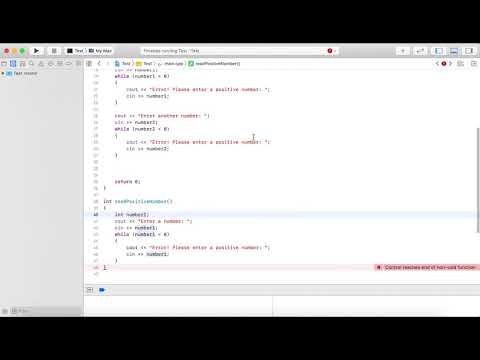
In this section, we will guide you through the practical application of using function parameters, arguments, and return types in your code. Follow these steps to create a simple addition function and utilize it in your program:
-
Create Variables: Start by creating two variables
number1andnumber2to store the two numbers you want to add together. -
Read User Input: Prompt the user to enter the first number and store it in
number1. Repeat the process for the second number by asking the user to input and storing it innumber2. -
Validation: Ensure that both numbers are positive. If either number is negative, display an error message and prompt the user to enter a positive number. Update the respective variable with the new input.
-
Implement the Addition Function: Identify areas in your code where you have duplicated addition logic. This is where you can optimize using a function.
-
Create the Function: Define a function that takes two parameters (num1 and num2) and adds them together to return the sum.
-
Call the Function: Instead of duplicating the addition logic, call the function and pass the two numbers as arguments. The function will calculate the sum and return it.
-
Display Result: Store the returned sum in a variable and output it to the user as the final result of the addition operation.
-
Test the Code: Run the program and test it with different number inputs to see how the function efficiently handles the addition process.
By following these steps, you can effectively utilize function parameters, arguments, and return types to streamline your code and improve its readability and reusability. Don't hesitate to experiment and explore further functionalities with functions in your programming projects!
Test your Knowledge
What is function overloading in C++?
Advanced Insights into Function Parameters, Arguments, and Return Types
In this section, we will delve deeper into the concepts of function parameters, arguments, and return types, building upon the foundational knowledge covered in the video.
When working with functions, it is crucial to understand the distinction between parameters and arguments. Parameters are placeholders defined in the function definition to receive values, whereas arguments are the actual values passed to the function when it is called. In the context of the example provided, num1 and num2 are parameters, while number one and number two are the arguments passed to the function.
One advanced aspect to consider is the importance of code optimization and reducing duplication. As demonstrated in the video, using functions can help streamline your code by encapsulating repetitive logic and avoiding redundancy. By centralizing common tasks within functions, you can make your code more maintainable and efficient, especially in cases where updates or corrections need to be made.
An essential practice when working with functions is to define clear and descriptive parameter names. This not only improves code readability but also helps in understanding the purpose of each parameter within the function. It is recommended to choose meaningful names that reflect the data being passed and processed by the function.
Tips for Effective Parameter Usage:
- Use descriptive parameter names to enhance code readability.
- Avoid unnecessarily complex parameter structures to keep functions concise and focused.
- Consider the scope of variables when passing arguments to functions to ensure the correct values are used.
Expert Advice:
When designing functions, aim for modularity and reusability by abstracting common logic into separate functions. This promotes a more organized codebase and facilitates easier debugging and maintenance in the long run.
Curiosity Question:
How can you leverage default parameters and variable-length argument lists in functions to maximize flexibility and adaptability in your code?
Additional Resources for Function Parameters, Arguments, and Return Types
- Article: Understanding Function Parameters in C++
- Video Tutorial: Mastering Functions in C++
- Book: "C++ Primer" by Stanley B. Lippman, Josee Lajoie, Barbara E. Moo
- Online Course: Functions and Return Types - C++ Programming - Tutorial
Explore these resources to deepen your understanding of function parameters, arguments, and return types in C++. Each of these materials offers unique insights and explanations to help you master this essential concept. Happy learning!
Practice
Task: Write a C++ program that demonstrates function overloading by creating multiple add functions for adding integers, floating-point numbers, and arrays.